Basic Programming In Scratch
Scratch is a simple programming language. It allows students to make animations, stories and mini-games through the joining of colour blocks. You will not have to type the hard code. All you do is drag and connect blocks to provide instructions.
Scratch makes learning programming enjoyable and fun by making it like joining puzzle blocks.
What is Scratch?
Scratch is a block-based language.
- It does not involve typing code but the use of colourful blocks.
- Every project is assembled by fixing blocks.
- It helps kids know how code works.
- Example: To move a cat, you simply drag a block marked 'Move' and connect it.
Parts of the Scratch Screen
Scratch has various sections, and when you open it, you will notice the following:
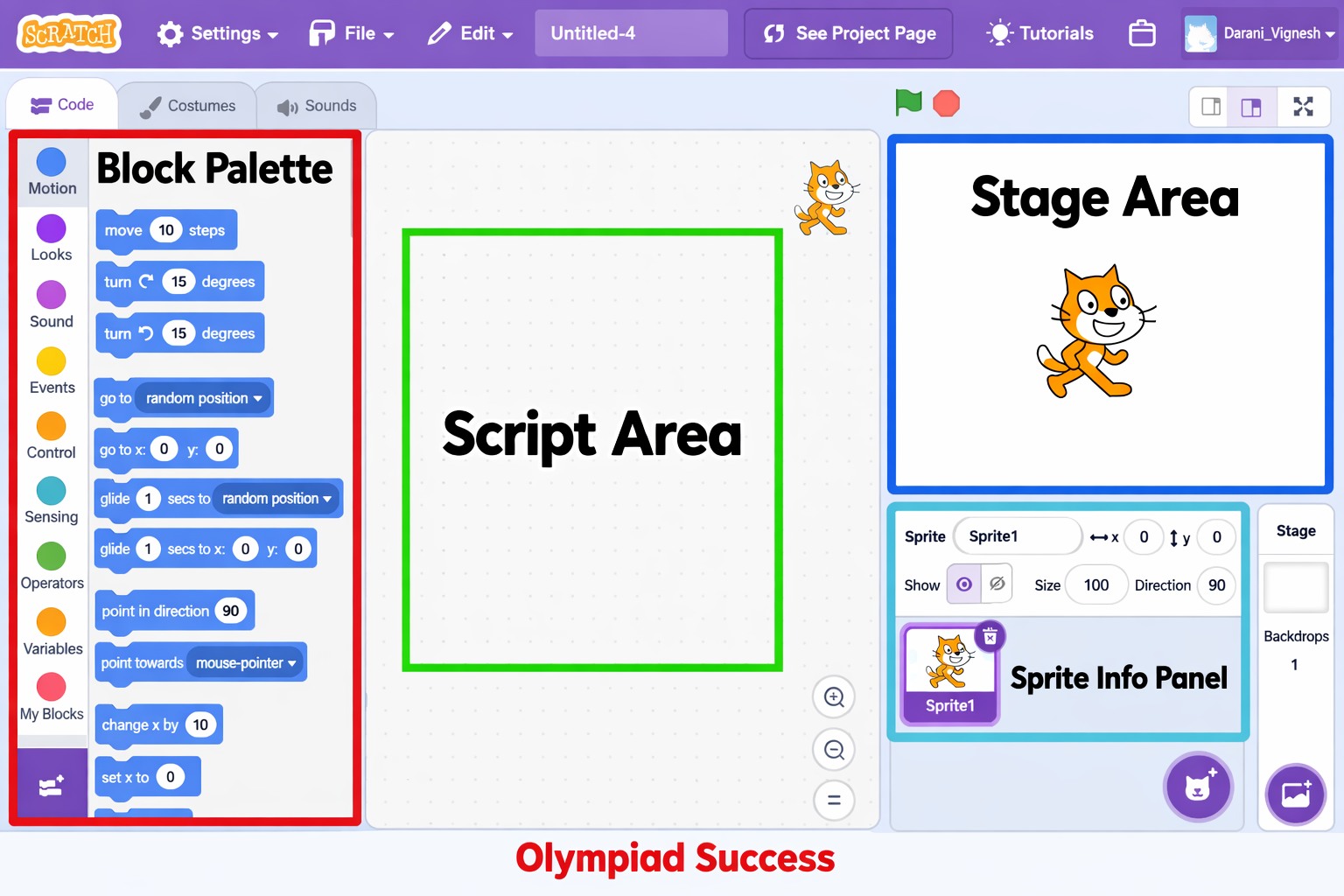
Stage
- Here, your animation or game is displayed.
- It tells you what your sprite is about.
- It functions as a projector screen.
Sprite
- A sprite is an object or a character.
- It can move and talk as well as change costumes.
- A project can have a large number of sprites.
Examples: A cat, a ball or a car can be a sprite.
Blocks Palette
There are various blocks displayed in this area.
- Blocks are grouped by colour.
- The colours are used differently.
Scripts Area
This is where you attach your blocks to create a program.
Types of Blocks
Blocks that Scratch uses have various categories.
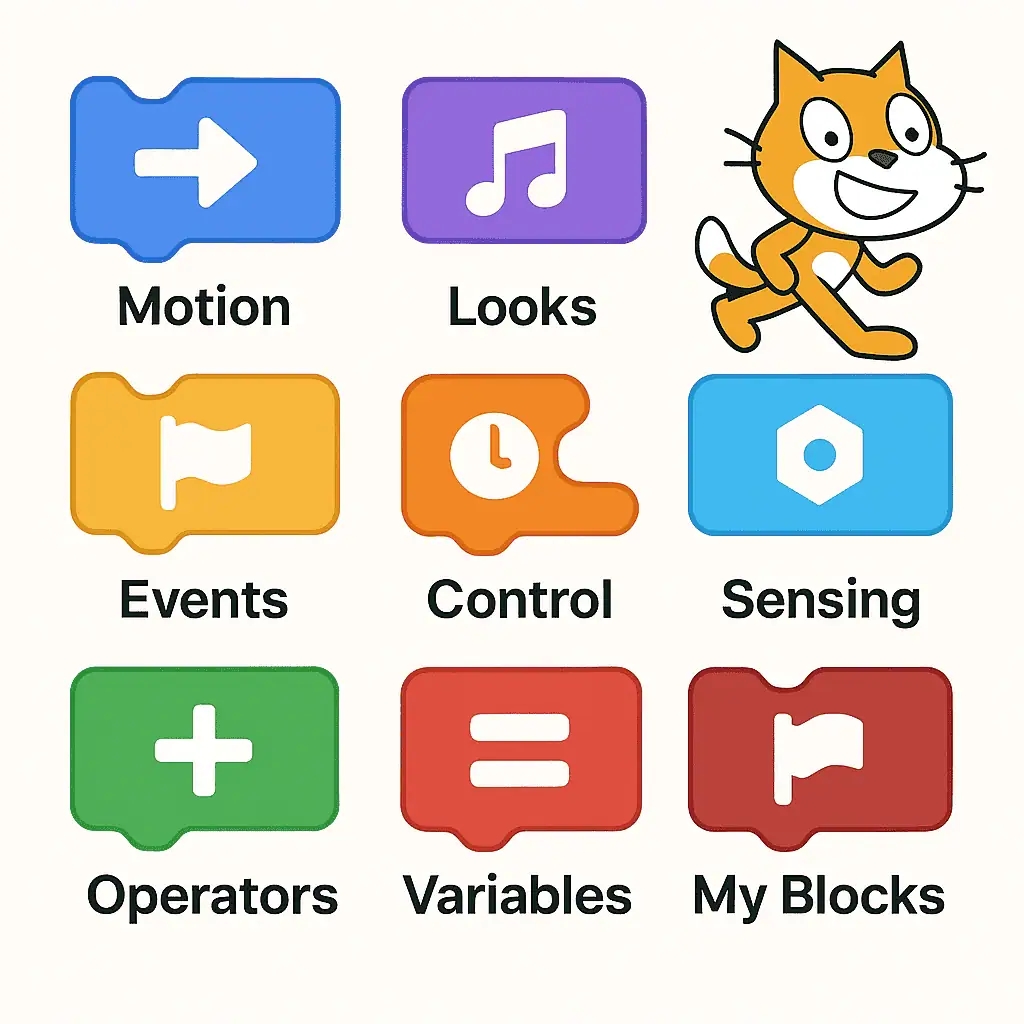
Motion Blocks
Used to move sprites.
- Move forward
- Turn left or right
- Go to a specific position
Example: Make the cat take 10 steps.
Looks Blocks
Used to change appearance.
- Get the sprite to say something.
- Change colour
- Switch costumes
Example: Make the sprite say, "Hello!"
Sound Blocks
Added to include music or sound effects.
- Play a sound
- Stop the sound.
- Change volume
Example: add a sound of a clap when the sprite moves.
Events Blocks
- These blocks are the initiators of the programme.
- "When the green flag clicked"
- "When key pressed"
Example: makes the sprite jump when the space key is pressed.
Control Blocks
Used to regulate the program flow.
- Repeat actions
- Use "Forever" loop
- Wait for some seconds
Example: repeat moving 10 steps 5x.
Creating a Simple Program
Let us make a simple program.
- Drag "When green flag clicked".
- Add "Move 10 steps".
- Add "Say hello for 2 seconds".
On clicking on the green flag, the sprite will move and talk.
Why Learn Scratch?
Scratch helps students:
- Think logically
- Solve problems step-by-step.
- Improve creativity
- Know the fundamentals of programming.
This is the first step in learning advanced programming languages.
QUIZ FOR BASIC PROGRAMMING IN SCRATCH
1. A student develops a little game in which a cat moves on the screen and speaks. What is the name of the cat in Scratch?
A) Script
B) Sprite
C) Stage
D) Block
Answer: B) Sprite
2. The animation is displayed in a Scratch project on a large display that serves as a projector screen. What is this area called?
A) Blocks Palette
B) Stage
C) Scripts Area
D) Toolbar
Answer: B) Stage
3. A student drags blocks and snaps them to build instructions for a sprite. What part of Scratch do you see these blocks attached to to create a program?
A) Stage
B) Scripts Area
C) Blocks Palette
D) Sprite List
Answer: B) Scripts Area
4. One of the sprites is set to advance 10 steps and go right. Of what type of blocks is such action primarily concerned?
A) Looks Blocks
B) Motion Blocks
C) Sound Blocks
D) Events Blocks
Answer: B) Motion Blocks
5. One of the sprites has the text "Hello!" on the screen in the course of an animation. What type of blocks are controlling this action?
A) Motion Blocks
B) Looks Blocks
C) Control Blocks
D) Events Blocks
Answer: B) Looks Blocks
6. A student desires to listen to music when it is time to jump with a sprite in the game. What category of scratch block is needed?
A) Motion Blocks
B) Looks Blocks
C) Sound Blocks
D) Control Blocks
Answer: C) Sound Blocks
7. In Scratch, what block is typically used to initiate a program when the green flag is clicked?
A) Motion Block
B) Events Block
C) Looks Block
D) Sound Block
Answer: B) Events Block
8. A sprite repeats in a continuous motion due to the usage of a loop. What is the type of blocks governing such repetitive actions?
A) Motion Blocks
B) Control Blocks
C) Events Blocks
D) Looks Blocks
Answer: B) Control Blocks
9. What region of Scratch allows all available programming blocks to be displayed in categories based on colour?
A) Stage
B) Scripts Area
C) Blocks Palette
D) Sprite Window
Answer: C) Blocks Palette
10. A student builds a program based on the blocks. When the green flag is clicked, -->Move 10 steps --> Say Hello for 2 seconds. What will occur when pressing the green flag?
A) The sprite disappears
B)The sprite will move and will show a message.
C) The programme is terminated instantly.
D) The sprite changes colour
Answer: B) The sprite will move and will show a message.