Networking
In Class 8, you got to know the way data moves in a network and what IP addresses are. Class 9 will make us have a better and more organised understanding of the network models, protocols and security concepts.
What is Networking?
Networking is a phenomenon that implies linking various devices, including computers, smartphones, and printers, to exchange data and resources. It supports the backbone of the internet and the local communication systems. It is possible through networking to do the following:
- Share data: The devices within a network can exchange data to and with the other devices in the network.
- Share resources: Resources can include printers, files and internet connections shared by devices.
In a very simplistic manner, networking can be deemed a bridge between various devices, enabling them to share data and communicate with each other without issues.
Types of Networks
Networking may be classified depending on the manner of the connections and sharing of resources by the devices. Networks are of two main types:
1. Client-Server Network
In a client-server network, a single computer, the server, offers its services and resources to the rest of the computers, the clients.
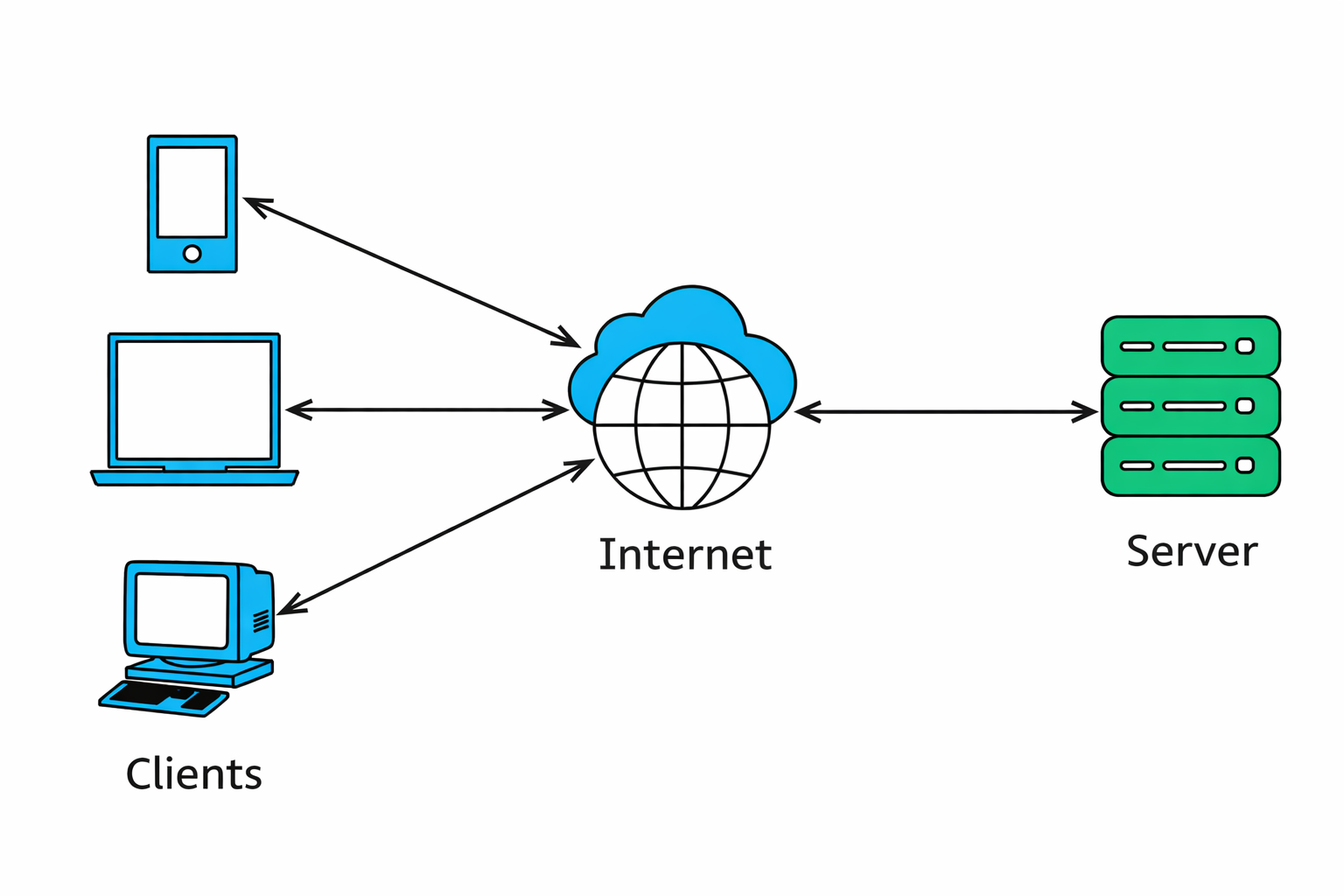
- Server: A computer of great power, which stores and hosts data or services.
- Clients: This refers to the devices (such as personal computers) that connect to the server in order to get resources or services.
Real-Life Example:
A server is a storage point for all the student data and resources (e.g., study materials) in a school. This data can be accessed and utilised by clients (such as student computers) using the server.
Key Features:
- The improved security and control.
- Appropriate in medium- to large-sized organisations such as schools and businesses.
2. Peer-to-Peer Network (P2P)
With a peer-to-peer network, all the computers are the same, and any computer is able to provide information to the other computers.
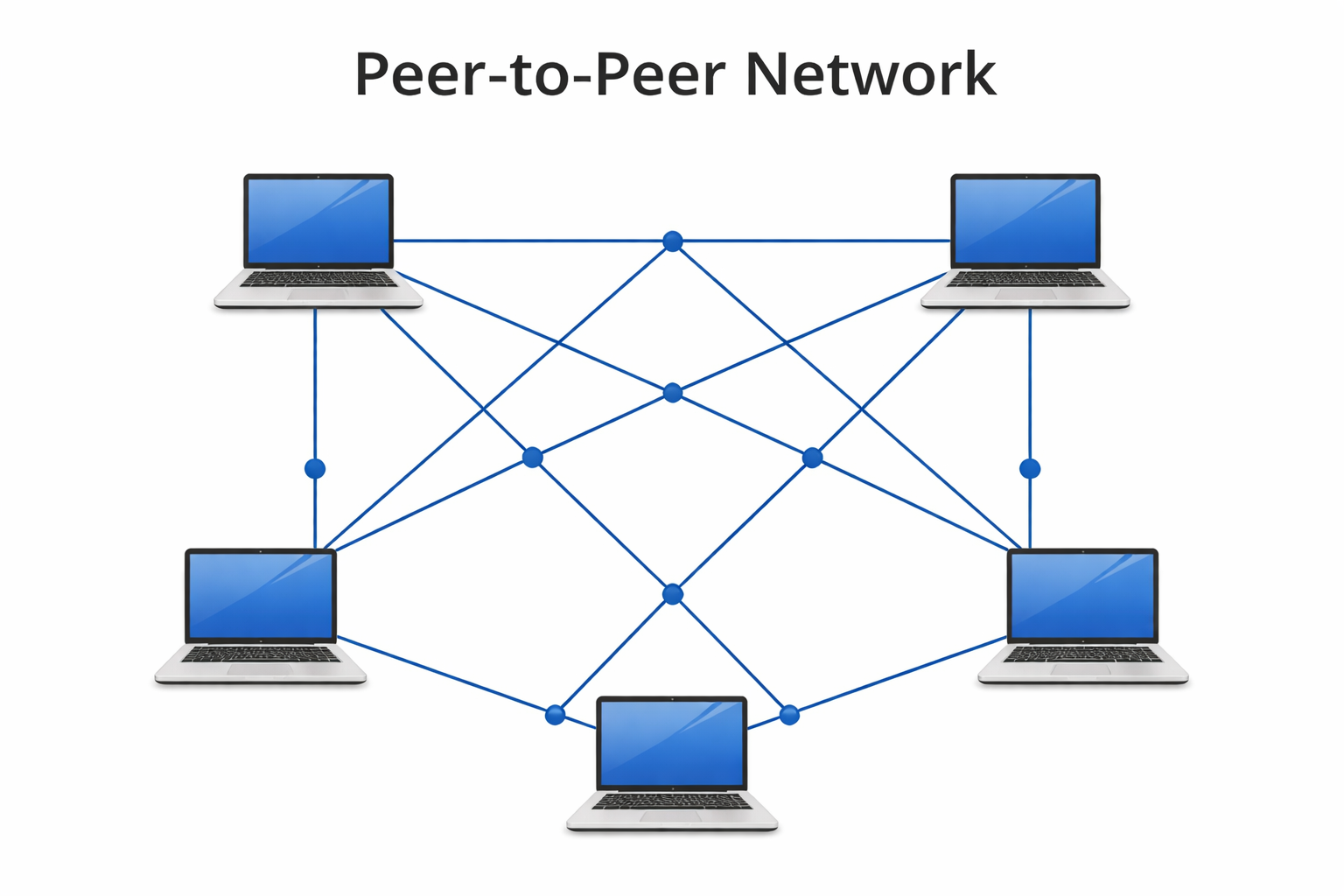
Peer: Each computer is a client and a server. There is no central server.
Real-Life Example:
With a small home network, all the computers belonging to the different members of the family can share files and printers without the necessity of having a central server.
Key Features:
- Simple and easy to set up.
- Weak in terms of security relative to client-server networks.
Network Protocols: OSI and TCP/IP
In networking, protocols refer to rules of how data is conveyed and received among devices. These standards are used so that devices can interact effectively.
Common Protocols:
- HTTP (HyperText Transfer Protocol): This is used to view the websites.
- FTP (File Transfer Protocol): It is used to transfer files between machines.
- SMTP (Simple Mail Transfer Protocol): It is utilised when sending emails.
The protocols enable various devices and applications to interact and share information in a safe and effective manner.
1. OSI Model (Open Systems Interconnection)
The OSI (Open Systems Interconnection) model is a model that explains the flow of data by any network. It is separated into 7 layers, with each layer having a particular role in the process of transmitting data.
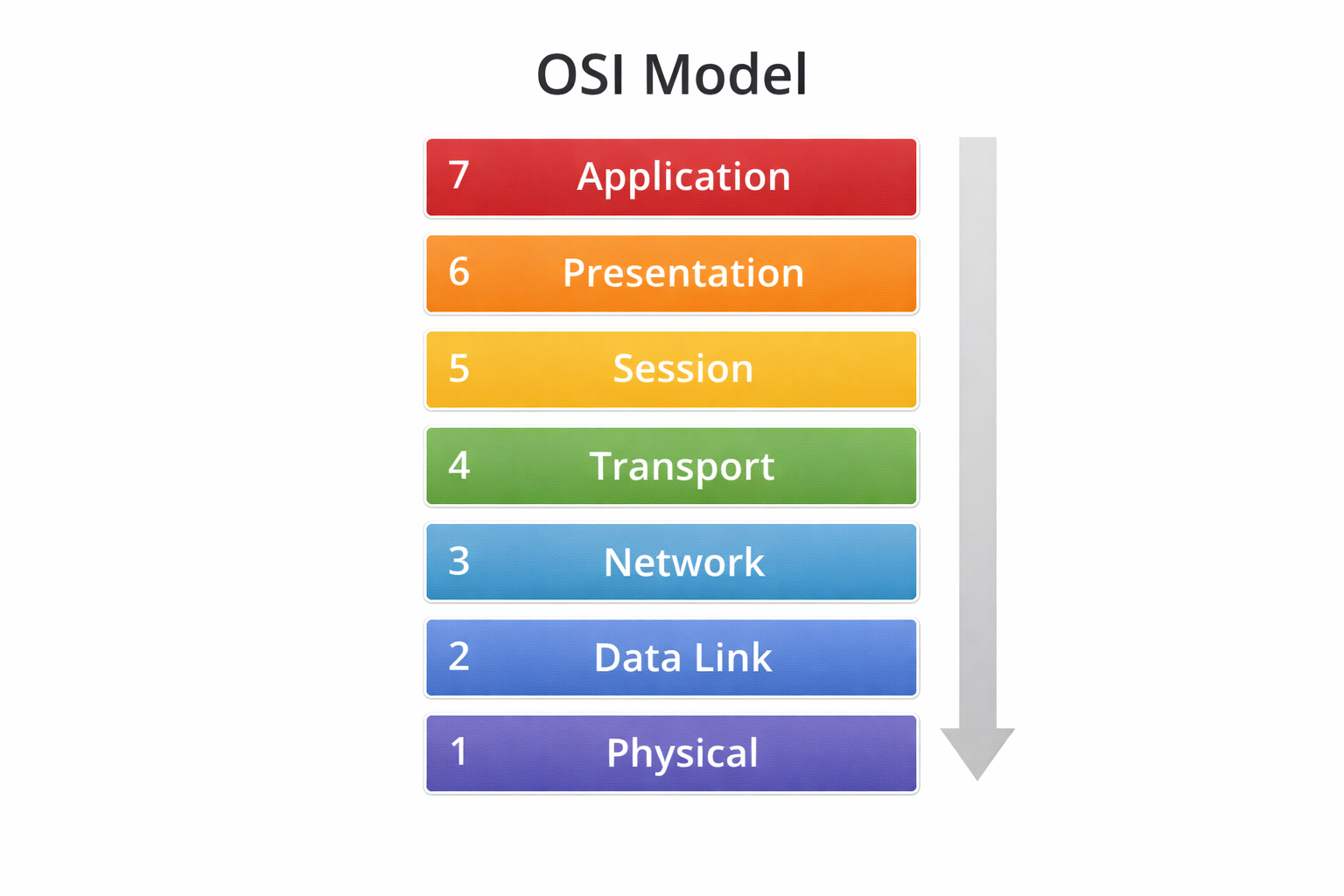
7 Layers of the OSI Model:
- Physical Layer: This is in charge of the physical transmission of information (through wires or wireless signals).
- Data Link Layer: Ensures that the data is properly passed between the devices in the same network.
- Network Layer: The layer that is involved in the routing of information between the source and the destination (through IP addresses).
- Transport Layer: This ensures that data is sent correctly and sequentially.
- Session Layer: Deals with communication sessions among devices.
- Presentation Layer: Translates information to a readable format.
- Application Layer: Communicates directly with the user (e.g., email or a web browser).
Why is it important?
The OSI model allows us to realise the flow of data between devices, and by subdividing the process into layers, the process of troubleshooting and enhancing the performance of the network becomes more manageable.
2. TCP/IP Model: The Backbone of the Internet.
A more practical and commonly used model that is used to transmit data over the internet is the TCP/IP (Transmission Control Protocol/Internet Protocol) model.
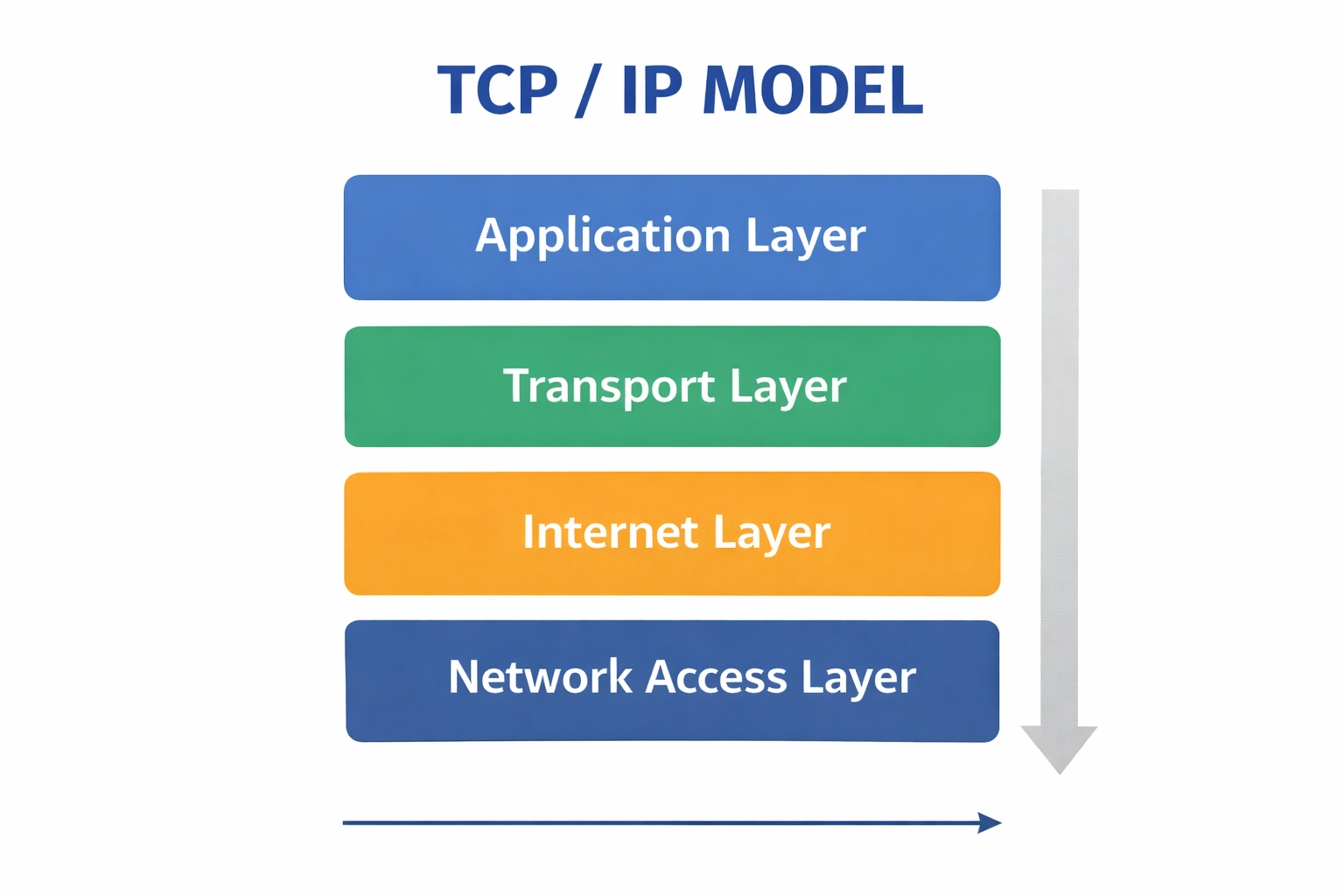
4 Layers of the TCP/IP Model:
- Application Layer: This is concerned with user applications such as web browsing and email.
- Transport Layer: Layer makes sure data is properly exchanged among computers.
- Internet Layer: Sends the data via the network (IP addressing).
- Network Access Layer: deals with the physical connection to the network.
Why is it important?
The internet is based on the TCP/IP model. It assists devices to interact and transfer information effectively, and as a result, billions of devices can connect and integrate effectively.
3. Network Security: Data Protection
As the internet and digital communication continue to be used more, it is important that the network security be excellent. It means the act of storing data and devices against unauthorised access and cyberattacks.
Key Security Measures:
- Firewalls: Preclude unauthorised access to networks.
- Antivirus Software: Cushions the devices against viruses and malicious software.
- Strong Passwords: This prevents the unauthorised access to accounts and systems.
- Two-Factor Authentication (2FA): It is an additional measure of security, as it involves two types of authentication.
- Regular Updates: Update software and neutralise vulnerabilities and bugs.
Why is it important?
Network security guarantees that your devices are not attacked by hackers and harmful software and your sensitive data remain unleaked to hackers.
Cloud Networking: Storing Data on the Internet
Cloud networking enables data to be saved and accessed on the internet and not on a physical device such as a hard drive or servers.
Advantages of cloud networking include the following:
- Anywhere access: You can get access to your files on any device that has an internet connection.
- Backup and Recovery: Automatically stores your data, and it will not be lost.
- Better Data Management: Cloud services offer convenient means of managing and sharing data.
Why is it important?
Cloud networking ensures that the data is safe and readily available and users can work and cooperate anywhere in the world.
Introduction To Ethical Hacking
Ethical hacking entails testing systems and networks with the aim of establishing security vulnerabilities. White-hat hackers (also referred to as ethical hackers) are contracted to enhance the security of the network by the organisation.
- Purpose: This is with the aim of identifying the weaknesses of the system before bad hackers can take advantage of them.
- Permission-Based: Once the ethical hackers have permission, they are never allowed to enter a system without first being given permission.
Why is it important?
Ethical hacking is one method which can enable organisations to be ahead of cyber threats and to enhance their security mechanisms.
QUIZ FOR NETWORKING
1. So what is the primary objective of computer networking?
A) To develop software programs.
B) To connect devices to exchange data and resources.
C) To auto-service computers.
D) To save information on spreadsheets.
Answer: B) To connect devices to exchange data and resources.
2. Which computer serves other computers?
A) Router
B) Client
C) Server
D) Switch
Answer: C) Server
3. With a peer-to-peer (P2P) network, every computer may serve as:
A) Only a server
B) Only a client
C) Both a client and a server
D) A database
Answer: C) A client and a server.
4. The mini home network provides an opportunity to share files and printers among all family computers without a central server. What type of network are you using?
A) Client-Server Network
B) Peer-to-Peer Network
C) Cloud Network
D) Hybrid Network
Answer: B) Peer-to-Peer Network
5. What is the most common protocol of viewing websites on the internet?
A) FTP
B) SMTP
C) HTTP
D) TCP
Answer: C) HTTP
6. What is the protocol that is employed in passing files between computers on a network?
A) FTP
B) SMTP
C) HTTP
D) DNS
Answer: A) FTP
7. Which OSI layer takes charge of routing data with IP addresses?
A) Physical Layer
B) Network Layer
C) Data Link Layer
D) Transport Layer
Answer: B) Network Layer
8. Which OSI layer takes charge of correct data transmission?
A) Application Layer
B) Transport Layer
C) Session Layer
D) Presentation Layer
Answer: B) Transport Layer
9. What is the security system that prevents any unauthorised access to a network?
A) Antivirus
B) Firewall
C) Encryption
D) Router
Answer: B) Firewall
10. Saving and retrieving files over the internet rather than a local computer is
A) Network routing
B) Cloud networking
C) Packet switching
D) Local storage
Answer: B) Cloud networking