Introduction to Scratch
- Scratch is an easy and enjoyable programming language.
- It assists students in making games, stories, and animations as they assemble colourful blocks.
- You will not have to enter challenging codes.
- You would rather drag and drop blocks to make your program work.
- Scratch is user-friendly and fun to use, as it is aimed at beginners.
What is Scratch?
Scratch is a visual programming language.
It allows students to:
- Create animations
- Design simple games
- Make interactive stories
- Add sound and music
Scratch assists in enhancing creative thinking and problem-solving
Main Parts of Scratch
The screen that opens when you open Scratch has various sections.
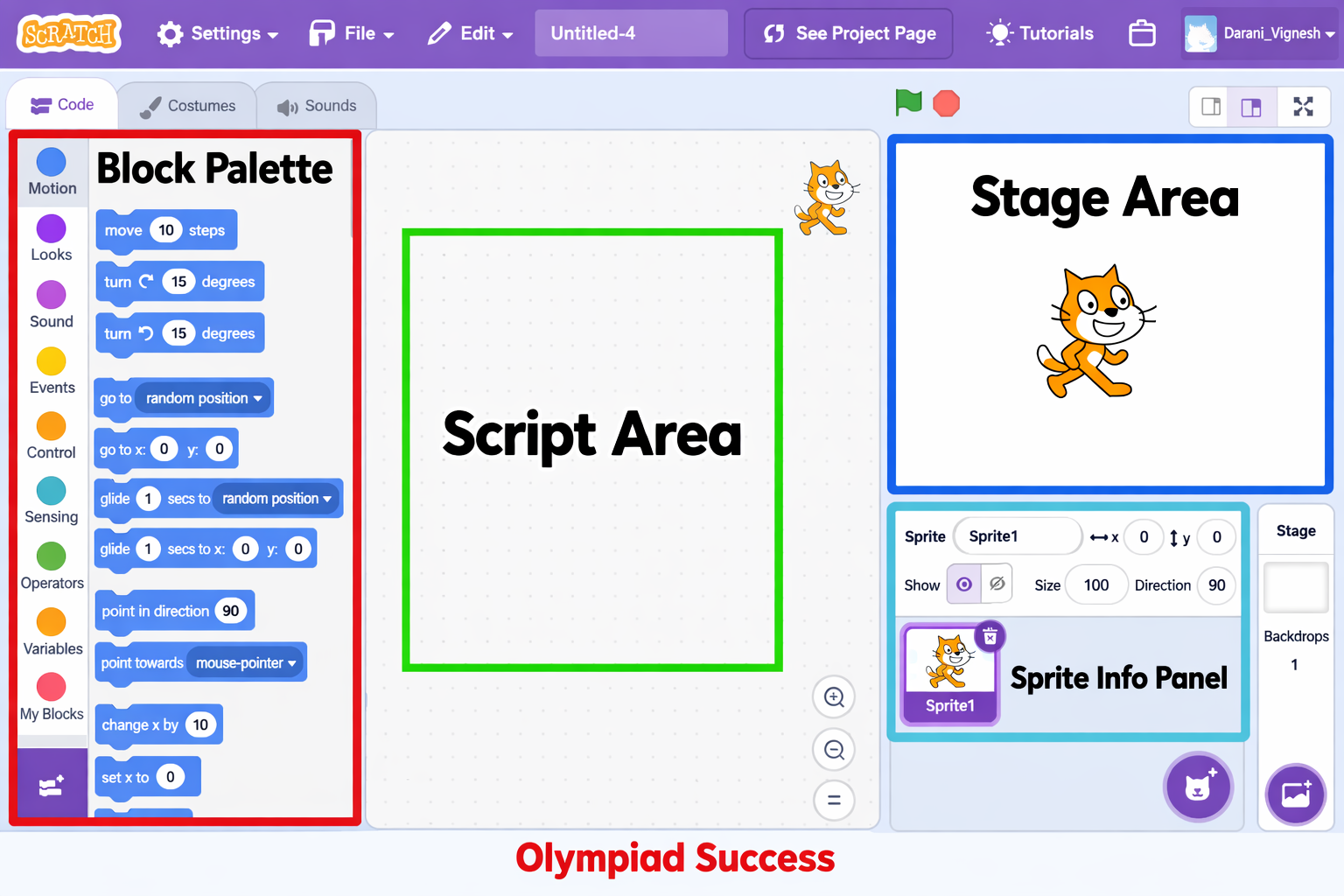
Stage
- Your project is executed on the stage.
- Here, the characters move, and the actions take place.
Sprite
- Scratch has sprites that are characters or objects.
- Sprites can be controlled through code blocks.
Coding Area
This is where you drag and combine blocks to form a program.
Blocks Palette
- Some blocks of different colours are found in this section.
- Every colour denotes a kind of action.
Types of Blocks
Scratch blocks are categorised as follows:
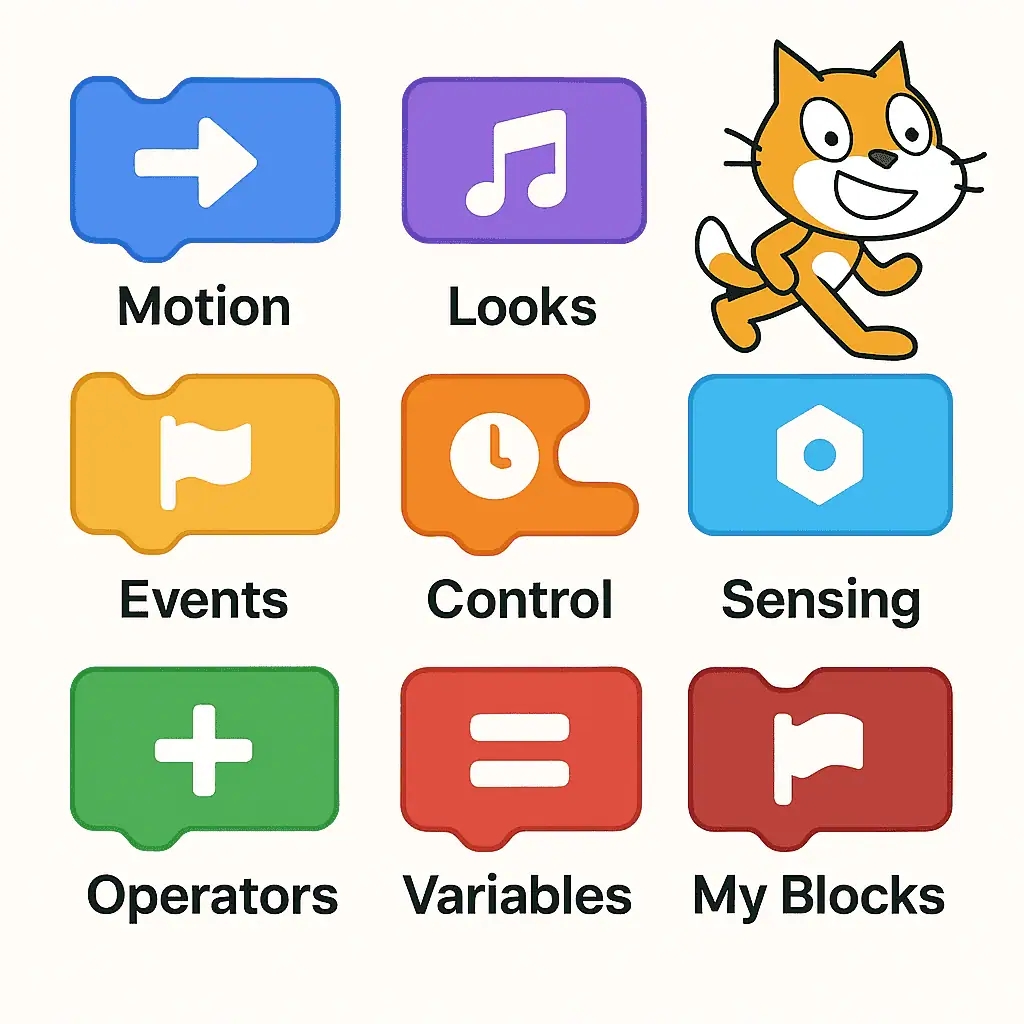
- Motion Blocks - Move sprites.
- Looks Blocks – Alternate appearance.
- Sound blocks – Add sound and music.
- Events Blocks - Start actions (e.g., when the green flag is clicked).
- Control Blocks – Repeat or control actions.
You mould these blocks into puzzle pieces.
Why Learn Scratch?
- It develops problem-solving abilities.
- It improves creativity.
- It assists in learning simple programming.
- It simplifies the process of learning code.
QUIZ FOR INTRODUCTION TO SCRATCH
1. One of the students makes a little animation in which a cat is moving and speaking on the screen. What is the name of the cat in Scratch?
A) Sprite
B) Block
C) Stage
D) Script
Answer: A) Sprite
2. What is the name of the place where all the animations and actions are seen by the audience in a Scratch project?
A) Coding Area
B) Stage
C) Blocks Palette
D) Menu Bar
Answer: B) Stage
3. One of the students pushes coloured blocks and attaches them to issue orders to a sprite. What are these blocks interlinked to create a program?
A) Stage
B) Coding Area
C) Toolbar
D) Title Bar
Answer: B) Coding Area
4. What is the name of the Scratch area with coloured blocks that are grouped by their functions?
A) Stage
B) Coding Area
C) Blocks Palette
D) Sprite List
Answer: C) Blocks Palette
5. The sprite is to move forward or turn left/right in an animation that is desired by a student. What are the blocks that will be used?
A) Looks Blocks
B) Motion Blocks
C) Sound Blocks
D) Events Blocks
Answer: B) Motion Blocks
6. One of the sprites shows the text 'Hello!' on the screen when story animation is being done. What type of blocks are applied?
A) Motion Blocks
B) Looks Blocks
C) Sound Blocks
D) Control Blocks
Answer: B) Looks Blocks
7. A student desires music to be played when a character jumps in the game. Which kind of Scratch blocks are to be used?
A) Motion Blocks
B) Sound Blocks
C) Control Blocks
D) Looks Blocks
Answer: B) Sound Blocks
8. When the green flag is clicked, a program starts running. What type of blocks govern this action?
A) Events Blocks
B) Motion Blocks
C) Looks Blocks
D) Sound Blocks
Answer: A) Events Blocks
9. A sprite is a movement in a game that repeats itself over and over again. What is the category of block that helps in the control of such repetitive actions?
A) Motion Blocks
B) Control Blocks
C) Sound Blocks
D) Looks Blocks
Answer: B) Control Blocks
10. What is one of the principal benefits of Scratch learning among students?
A) It substitutes all programming languages.
B) It enhances innovativeness and problem-solving.
C) It stores computer files
D) It manages networks
Answer: B) It enhances innovation and problem-solving.